Case Summary: Old External Drive Shows Error on Connection
A client brought us their Buffalo 500GB USB hard drive (Model: HD-CX500U2) after it had been sitting unused in a cupboard for several years. When they tried to use it again, the drive failed to load and showed an error upon connecting to a PC.
Thankfully, instead of continuing to troubleshoot on their own—or worse, reformatting the drive—they turned to the professionals at 555 Data Recovery Co.
Diagnosis: Weak Read Heads Detected
After a free initial inspection, our engineers identified that the drive’s read heads were too weak to pass its internal self-test. This is a common issue in older drives, especially those left unused for extended periods.
With the client’s permission, our clean room specialists performed a head stack assembly swap inside our certified CLASS100 clean room. This advanced procedure allowed us to safely create an image of the drive to our servers, with an impressively low error rate of less than 8%—a solid result for a drive of this age and condition.
A New Challenge: Encrypted Data & a Forgotten Password
But the job wasn’t done yet.
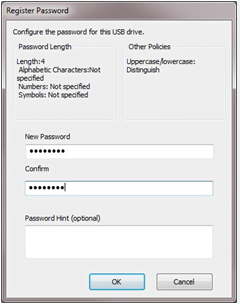
The client’s data was encrypted, and unfortunately, they had completely forgotten setting a password for the drive—let alone what it might have been.
Luckily, older BUFFALO drives support password hints, and this drive had one.
We invited the client to our Everton Park lab in QLD, where we gave them private access to one of our secured workstations. After around 10 to 15 attempts, the client struck gold—they remembered the password!
Final Steps: Decryption and Safe Transfer
Once decrypted, we securely transferred all recovered data to a new, healthy external drive. The client picked it up the very next day—data fully restored and a big smile on their face.
Key Takeaway: Don’t Lose Your Password!
The moral of the story: Even if the recovery is successful, a forgotten password can make your data permanently inaccessible. Always store your passwords safely, and never attempt DIY recovery on encrypted or damaged drives.